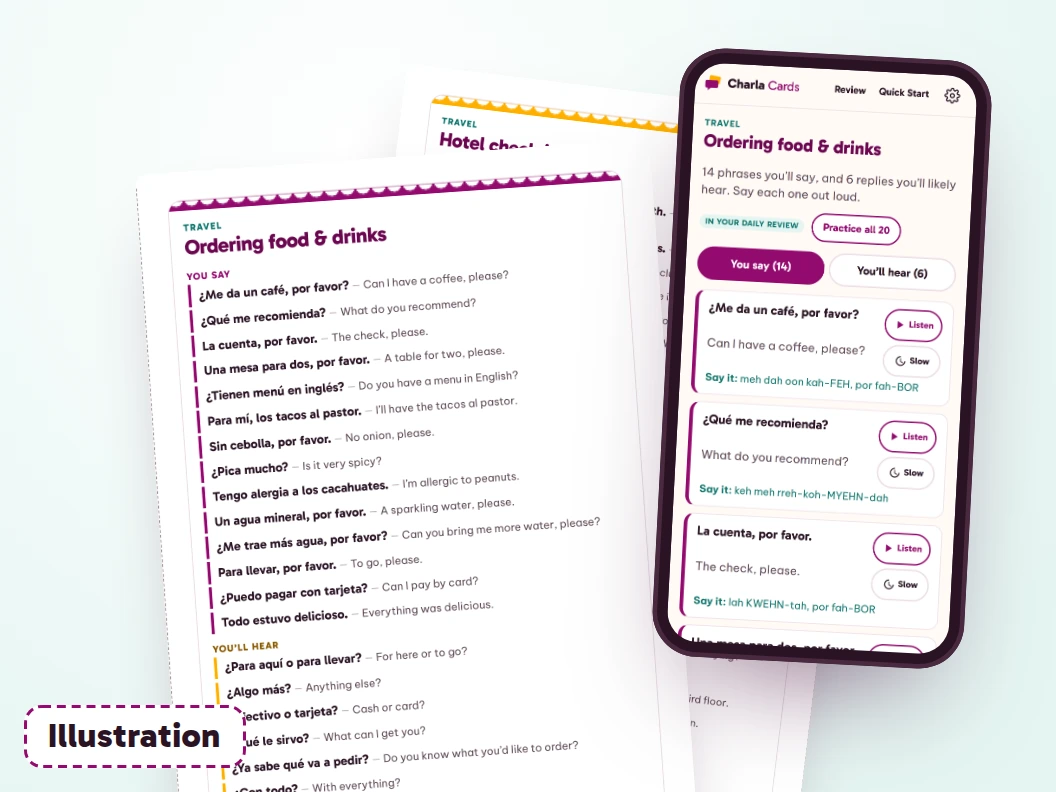
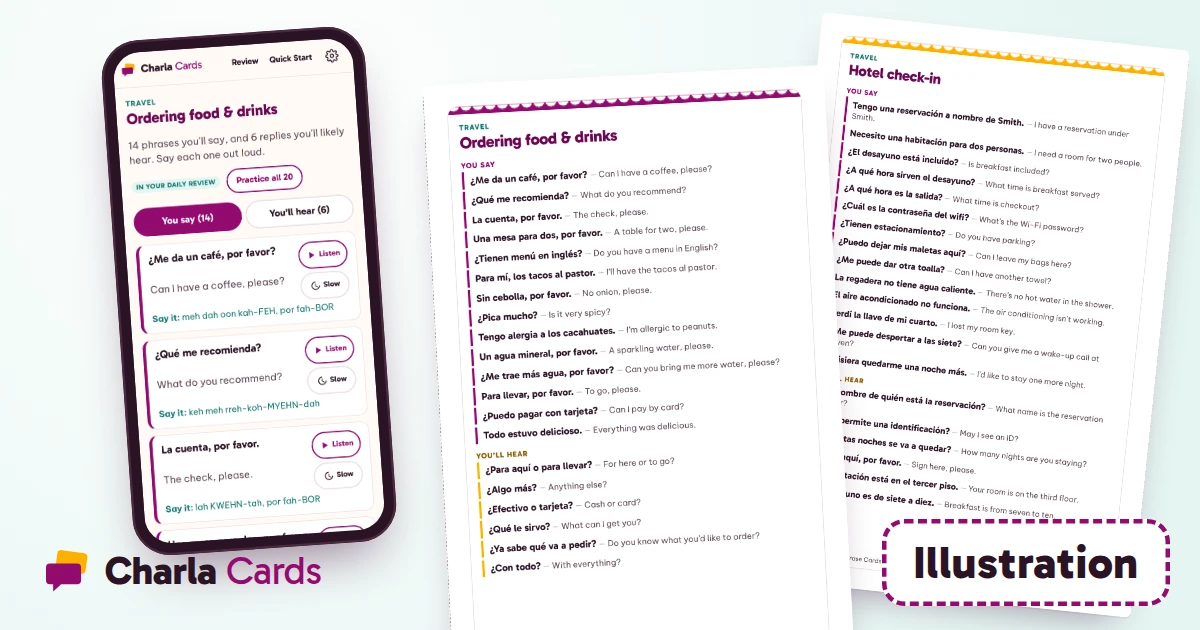
The freeze at the counter: what you'll say, and what you'll hear back in Spanish.
600 Spanish phrases for 30 real situations, what you'll say and what you'll likely hear back, in an app that works offline, with a short daily review and a listen button that uses your phone's own Spanish voice.
The listen button uses your device's built-in Spanish voice. How it sounds depends on your device. There's no recorded audio in the app.
Why do I freeze when I know some Spanish?
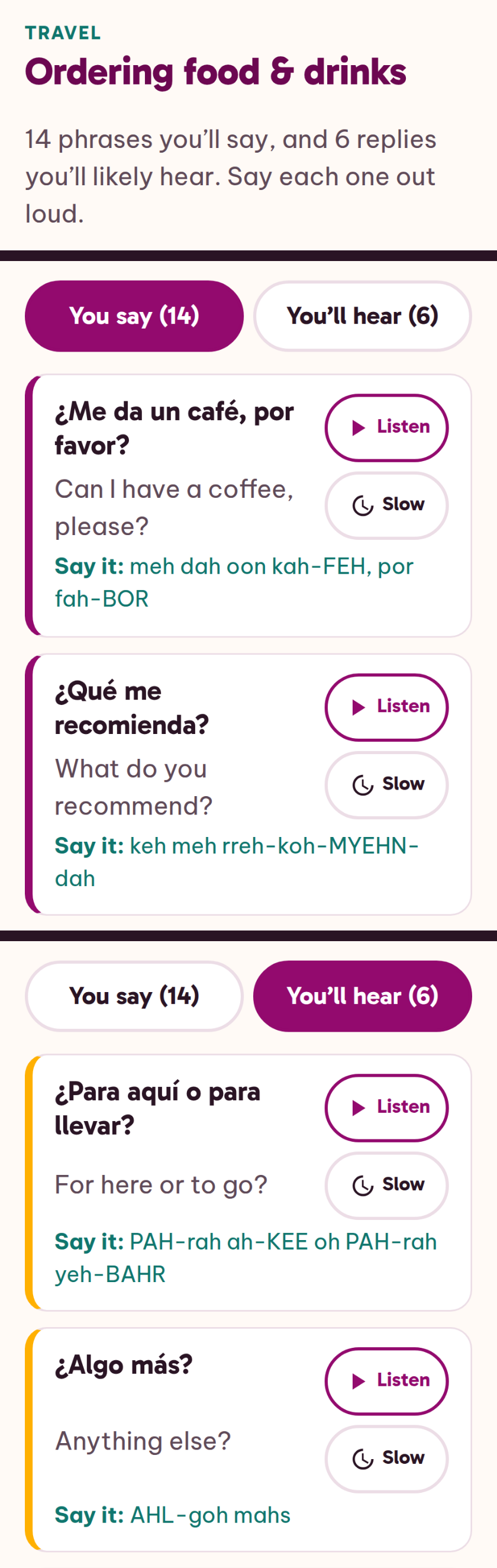
You walk up to the counter with your sentence ready. ¿Me da un café, por favor? (Can I have a coffee, please?) It comes out fine. Then the person behind the counter answers, fast, with a question you didn't plan for, and the whole thing stops.
Charla Cards works on two parts of that moment, and neither one is about being "bad at languages." The first is your side: the exact words that moment needs, said out loud until they come out without hunting for them. The second is their side: the handful of replies people tend to give in that spot. A list of phrases helps with the first. The second takes their half of the conversation, too.
What is the Say-and-Hear Loop?
It's how every situation in Charla Cards is built. Each one has 20 phrases:
14 you'll say. The lines that moment needs, in Spanish and English, with a pronunciation tip written out in English sounds.
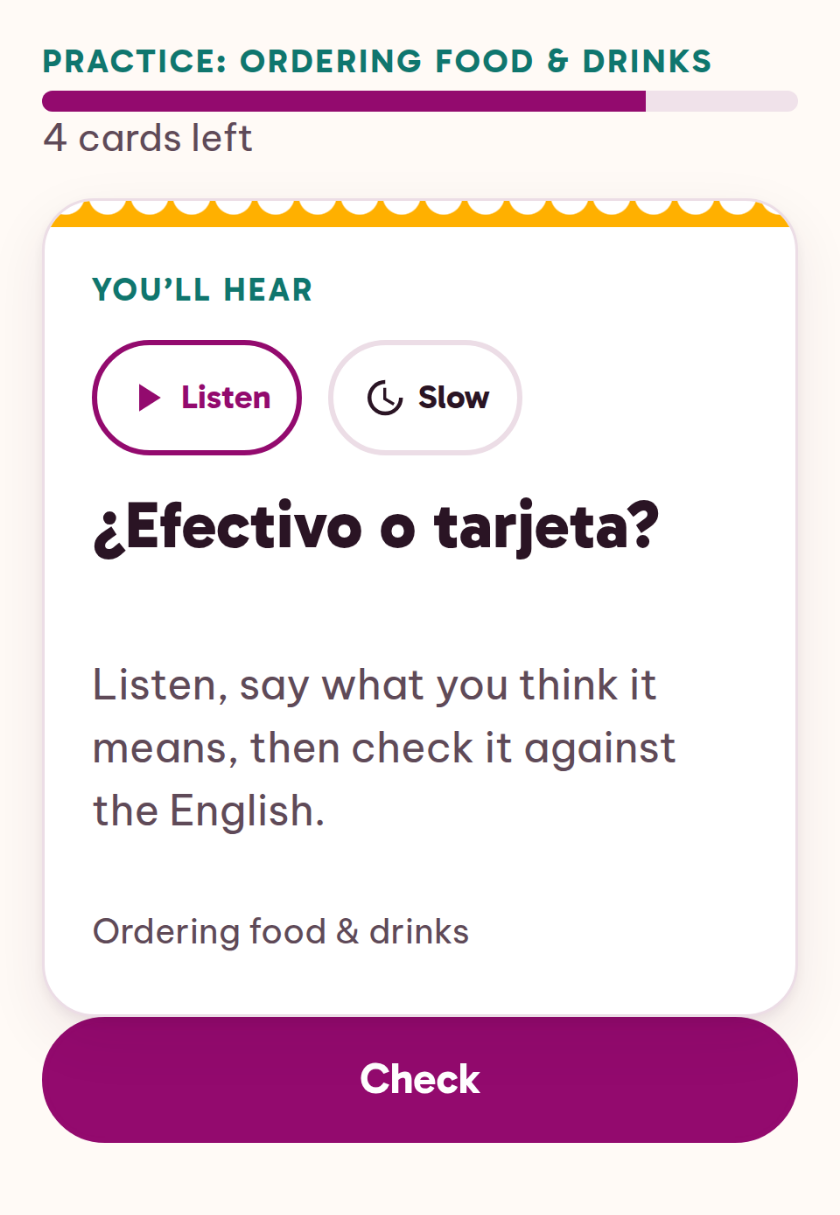
6 you'll hear. The replies you'll most likely get back in that spot, each with the English beside it, played in your phone's Spanish voice at normal speed or slow.
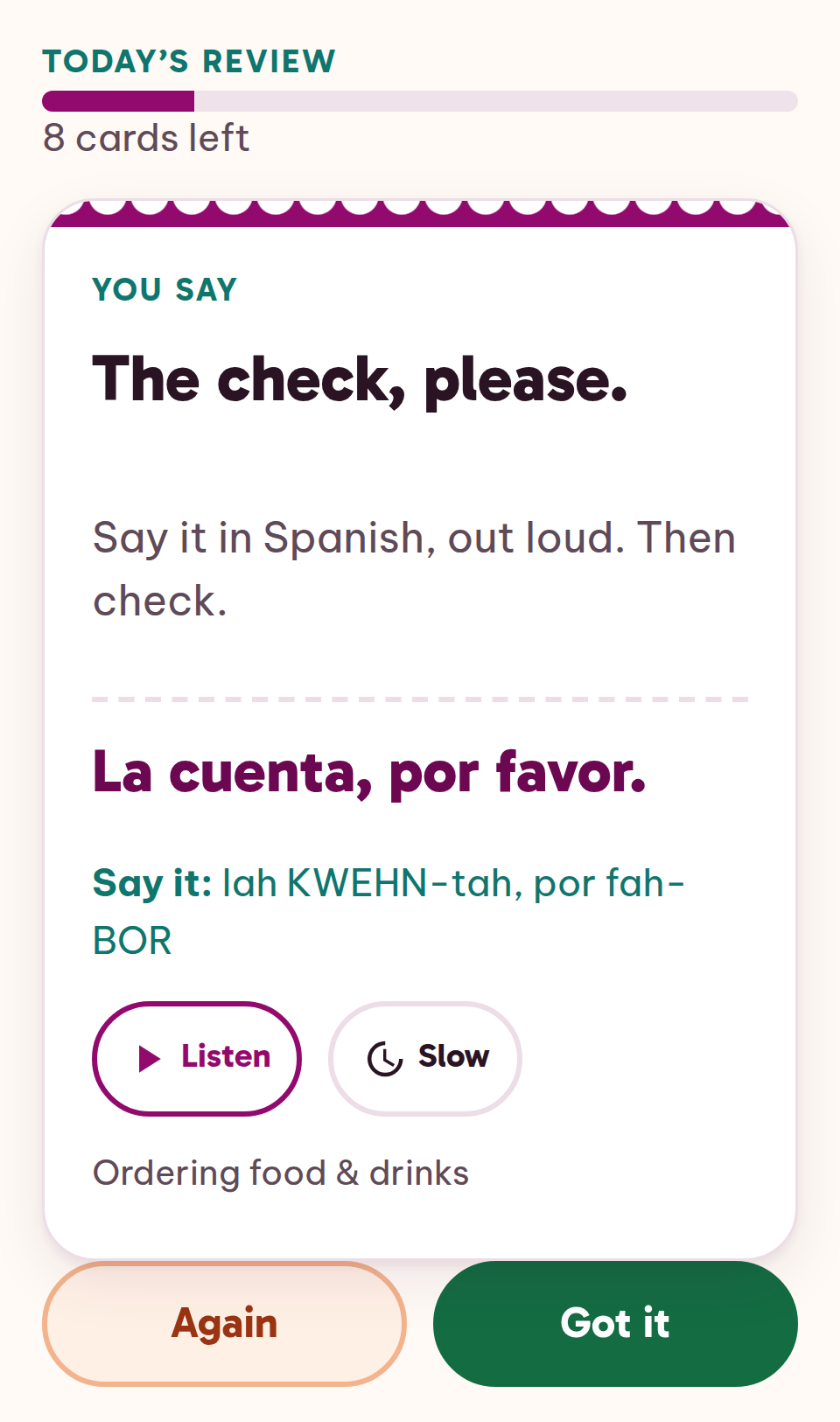
At the counter, that means you practice ¿Qué me recomienda? (What do you recommend?) and La cuenta, por favor (The check, please). And you also practice hearing ¿Para aquí o para llevar? (For here or to go?), ¿Algo más? (Anything else?), and ¿Efectivo o tarjeta? (Cash or card?).
Then the loop: a short review each day brings back the cards that are due. You see the English, say the Spanish out loud, check it, and mark it "got it" or "again." The app schedules when each card comes back, sooner for the ones you marked "again." The replies are for your ears: tap listen, normal speed or slow, say what you think it means, and check it against the English.
Which situations are in it?
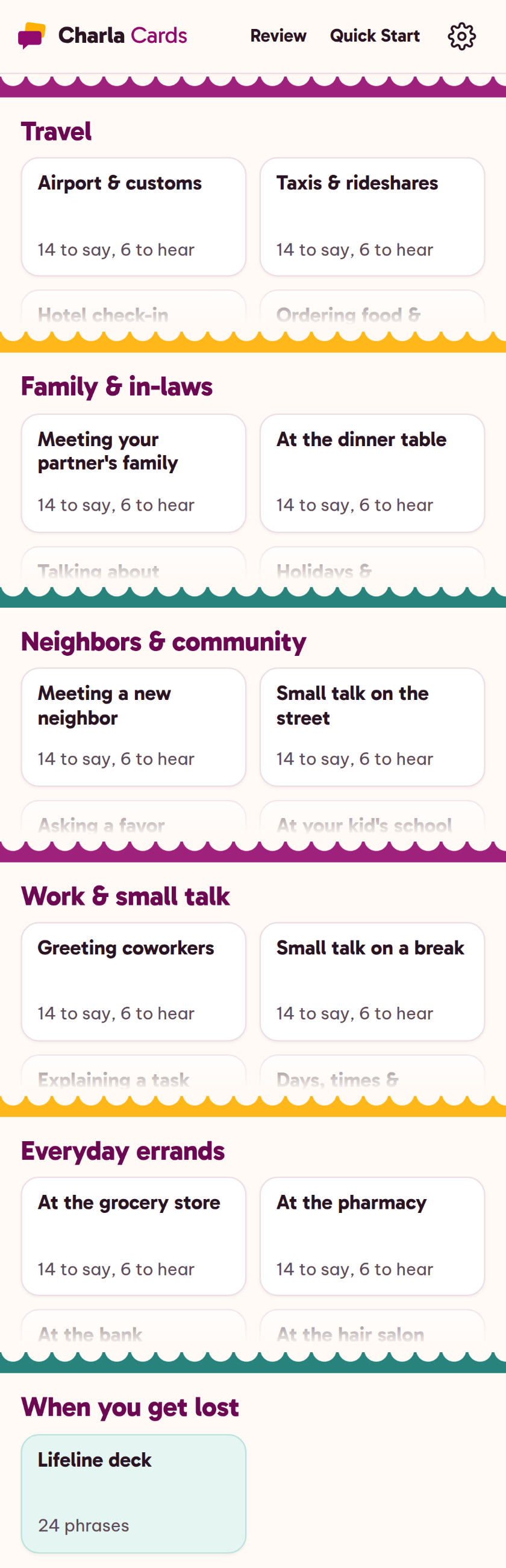
Thirty situations, six in each part of life:
Travel. Airport & customs; Taxis & rideshares; Hotel check-in; Ordering food & drinks; Asking for directions; Shopping & paying.
Family & in-laws. Meeting your partner's family; At the dinner table; Talking about yourself; Holidays & celebrations; Video calls; Playing with the kids.
Neighbors & community. Meeting a new neighbor; Small talk on the street; Asking a favor; At your kid's school; At a community event; Packages, parking & noise.
Work & small talk. Greeting coworkers; Small talk on a break; Explaining a task; Days, times & schedules; Helping a customer; Taking a work call.
Everyday errands. At the grocery store; At the pharmacy; At the bank; At the hair salon; At the auto shop; Home repairs & appointments.
Plus the Lifeline deck: 24 phrases for keeping any conversation going when you get lost. Más despacio, por favor (More slowly, please). ¿Me lo puede repetir? (Could you say that again?). ¿Cómo se dice… en español? (How do you say… in Spanish?)
Whose voice is it?
Your phone's. The listen button uses your device's built-in Spanish voice. How it sounds depends on your device. There's no recorded audio in Charla Cards, and no native speaker reads the phrases.
If your device has a Mexican Spanish or US Spanish voice, the app uses it. If not, it uses another Spanish voice on your device. Every phrase plays at normal speed or slow. The Quick Start shows how to add a Spanish voice if your phone doesn't have one yet.
If you want recordings of native speakers, a phrasebook with audio has them, and Charla Cards doesn't. What Charla Cards has is the reply side of each situation, the daily review, and the app in your pocket.
Does it work offline?
The phrases, the daily review, and your progress work without internet, and your progress is saved on your phone. Whether the listen button also plays without internet depends on your device: it needs the Spanish voice installed on the phone itself, and the Quick Start shows how to check.
Which Spanish?
Everyday Latin American Spanish, with Mexican Spanish as the base. It's what you'll hear in Mexico, and from many Spanish speakers in the US. If you're headed to Spain, some words will differ, and you'll hear the vosotros form, which the app doesn't teach.
Isn't this what a phrasebook does?
Partly. A phrasebook gives you phrases, often with audio. Charla Cards gives you the phrases for 30 situations, the replies you'll likely hear in each one, and a daily review that brings each card back on a schedule, in an app that works offline. If a phrasebook already gets you through, keep it.
On your phone, offline
The Charla Cards app. 600 phrases in 30 situations, 14 to say and 6 to hear in each. Install it on your phone's home screen; it opens like any app.
The Lifeline deck. 24 phrases for asking someone to slow down, repeat, or explain.
The daily review. The cards that are due today, scheduled from your answers.
The listen button. Your device's built-in Spanish voice, normal or slow.
Phrase Cards (PDF). 31 cards to print: one for each situation, plus the Lifeline.
The Quick Start and email support. How to install the app and turn on a Spanish voice, and help at support@charlacards.site for 12 months.
How much is it?
Charla Cards: Spanish for Real Situations — $47 USD, one-time payment
The listen button uses your device's built-in Spanish voice. How it sounds depends on your device.
A few more questions
Will this get me through a whole conversation?
Nothing here promises that. Charla Cards gives you the phrases for the situations you'll be in, the replies you'll likely hear, and a way to practice them. Conversation beyond those is still up to you, and the Lifeline deck is there for when you get lost.
Is it a course?
No grammar lessons, no videos. It's phrases by situation and a daily review. If you'd like the verbs behind the phrases, there's an optional add-on after checkout.
Does it correct my pronunciation?
No. You say each phrase out loud and check yourself against the written tip and the listen button.
Which phones does it work on?
iPhone and Android phones, and computers too, in the browser. On your phone you add it to your home screen, and it opens like an app. The Quick Start walks you through it.
My trip is in two weeks. Is that enough?
Start with the situation you'll walk into first, and review it each day until you go. Nobody can promise how much will stick by then. You'll have practiced the words that moment needs.
Who is Charla Cards?
Charla means "chat." You won't find a reviews section here, because no buyer has written one yet. What you will find is the app itself: the situations, the phrases, and the reply side, the way they appear on your phone. Your order is processed by Auryon369 (Fracktal Technologies LLC), the merchant of record, and the charge appears on your card statement as AURYON CHARLACRDS.
What happens after I pay?
You get an email with the link to your access page. Open it on your phone, add Charla Cards to your home screen, and start with the situation you'll walk into first.
¿Y si no es para mí? (And if it's not for me?)
30-day money-back guarantee: email support@charlacards.site within 30 days of your purchase and you'll get a full refund of that purchase.
Pick your first situation.
The airport, the dinner table, the counter. Install it on your phone and practice the situation you'll walk into first.